An everyday guide to using iPhone and Android with a spinal cord injury—one tool at a time.
“Just tap the screen.”
A remarkably simple instruction, unless your fingers have declined to participate.
It has taken me two years to get basic technology use back. It started with one tool at a time. Learning one feature, practicing it, and finding another way around something that still did not work.
From the outside, sending a text or opening an article might look like a small accomplishment. From this side of quadriplegia, those ordinary actions can represent getting a piece of your life back.
That is how I want people to approach this guide. Pick one thing you want to do more easily. Start there.
First tool: make everyday controls easier to reach
If you can touch the screen but struggle with gestures or physical buttons, iPhone’s AssistiveTouch provides an onscreen menu.

Setup: Settings → Accessibility → Touch → AssistiveTouch → On.
You can customize the menu to put frequently used actions within easier reach. This still requires a way to select a control; turning it on alone does not make the phone hands-free. Apple’s illustrated AssistiveTouch guide.
On Android, explore Accessibility Menu for larger onscreen controls. For writing, keyboard dictation can reduce the amount of tapping needed on either platform. Android accessibility guide.
Next tool: tell the phone where to tap
Apple’s Voice Control and Google’s Voice Access let you operate your phone with spoken commands. Overlays help when the button you want is difficult to name.
Number overlay: give each button an address
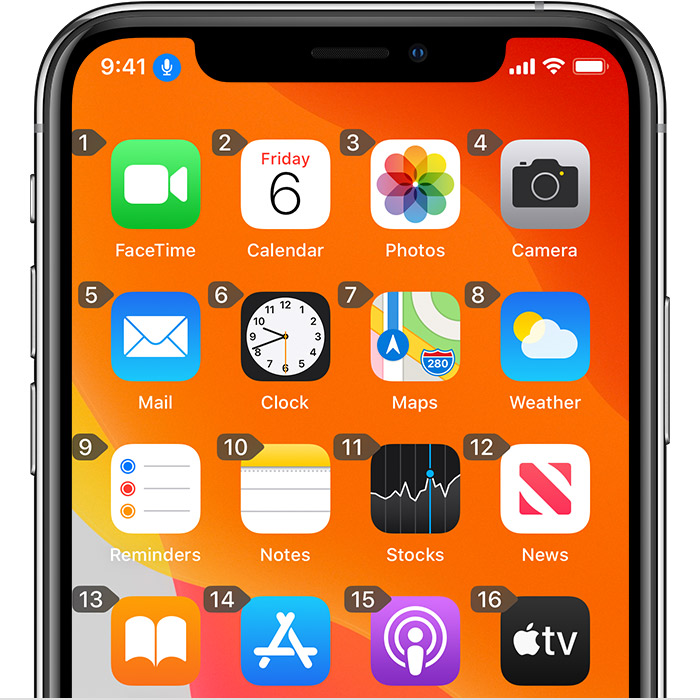
With Voice Control active, say “Show numbers.” Find the number beside the item you want, then say “Tap” followed by that number.
The numbers change depending on the screen. You do not have to memorize them.
Grid overlay: reach a specific spot
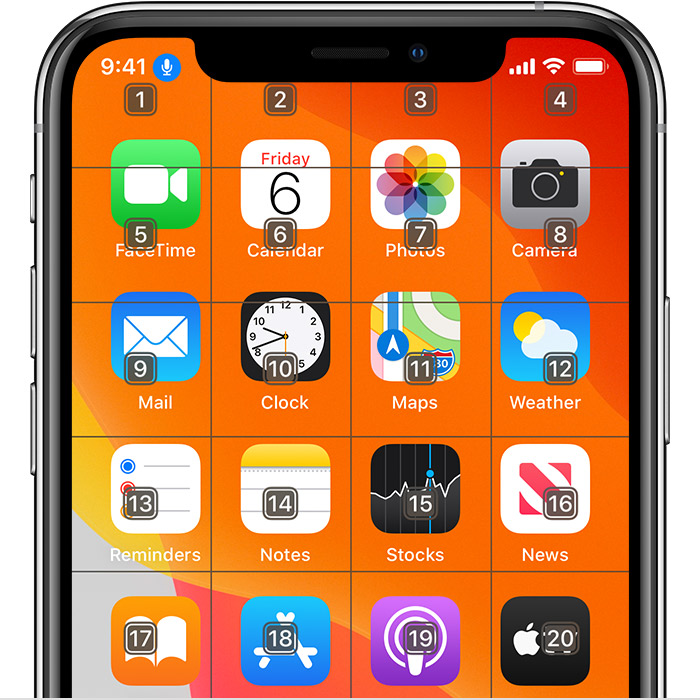
Say “Show grid.” Speak the number covering the area you want to narrow down. The smaller grid helps you target a precise location. Say “Show grid continuously” to keep it available across commands. Apple’s Voice Control instructions.
It is a little like giving directions to someone who cannot understand “that thing right there.” Except that someone costs several hundred dollars and lives in your pocket.
A quick setup card
| Step | iPhone | Android |
|---|---|---|
| Find the tool | Settings → Accessibility → Voice Control | Settings → Accessibility → Voice Access |
| Set it up | Follow the initial setup and download | Install Google’s Voice Access if needed, then follow its setup |
| Enable it | Turn on Voice Control | Depending on the version, enable “Use Voice Access” or “Voice Access shortcut” |
| Try an overlay | Say “Show numbers” or “Show grid” | Use numbered labels or grid commands |
| Practice | Open an app, select an item, and scroll | Open an app, select an item, and scroll |
Android’s setup varies by version and manufacturer. Follow the instructions displayed on your device. Google’s Voice Access setup guide and command guide explain the options.
Short video: Watch Apple Support demonstrate Voice Control and numbered overlays. The video uses an older interface but shows the basic approach.
More customized tools: eyes, switches, and shortcuts
For people who need alternatives to speaking or tapping, supported iPhones offer Eye Tracking. Setup is under Settings → Accessibility → Eye Tracking, followed by calibration. A steady, comfortable phone position matters. Apple’s Eye Tracking instructions.
Apple’s Switch Control and Android’s Switch Access support alternative inputs, including compatible external switches. Apple’s Shortcuts can also combine repeated actions into routines. These options take more setup, but can be explored around a specific goal, such as answering messages or opening a writing app. Explore Apple’s accessibility features.
You do not have to “graduate” through every feature. Use the combination that fits your movement, comfort, and daily life.
Give the phone somewhere useful to live
A phone holder can be as important as the software. Voice commands are considerably less useful when your phone is face down on the blanket.
These are places to explore wheelchair mounting options:
RAM wheelchair armrest mount with quick release and swivel — Check compatibility with your wheelchair’s armrest attachment and your phone.
RAM wheelchair seat-track phone mount — Check track compatibility, reach, and clearance.
ModularHose assistive-technology mounts — Check the combination of holder, arm, and base needed for your setup.
These manufacturers offer different mounting systems; a phone holder alone may not include the arm and wheelchair attachment.
Before choosing, think through the whole day: sitting upright, changing position, transferring, and using the phone from bed. Consider who will reposition it and whether its release mechanism is usable for you.
Phone-holder comparison: compact, flexible, and fixed-arm options
Cost guide: $ = budget-friendly; $ = moderate; $$ = expensive; $$ = premium. These broad comparisons reflect upfront device cost across this guide, not product quality. Prices, tax and shipping vary; follow the product links for current totals. These are researched options, not hands-on reviews. Measure your phone with its case and confirm the attachment fits your chair.
| Phone holder | Relative cost | Mount and fit | Benefits and limits |
|---|---|---|---|
| ComfyGO Universal Phone Mount | $ | Rubber-lined alloy clamp; phone holder opens up to 4 inches. | Compact wheelchair/scooter option. Confirm frame-clamp dimensions with the seller; the listing does not specify them. |
| ModularHose 14-inch Arm + Spring Clamp, #110621 | $ | Flat surface up to 2 inches thick; phones 2.25–4 inches wide, cases up to 5/8 inch deep. | Bendable arm, holder and clamp included. Requires a suitable flat mounting surface and squeezing the clamp. |
| RAM armrest mount with quick release and swivel | $$ | Rigid arms with adjustable ball joints; compatible armrest track or Invacare armrest. | Swivels aside; entire mount disconnects without resetting joints. Requires compatible hardware and ability or help to operate knobs. |
| RAM X-Grip wheelchair seat-track mount | $$ | Seat-track base, rigid 9-inch pipe extension and adjustable socket arms. | Extended positioning from the seat track. Check transfer clearance, track fit and phone dimensions. |
ComfyGO: a compact clamp-on option — $
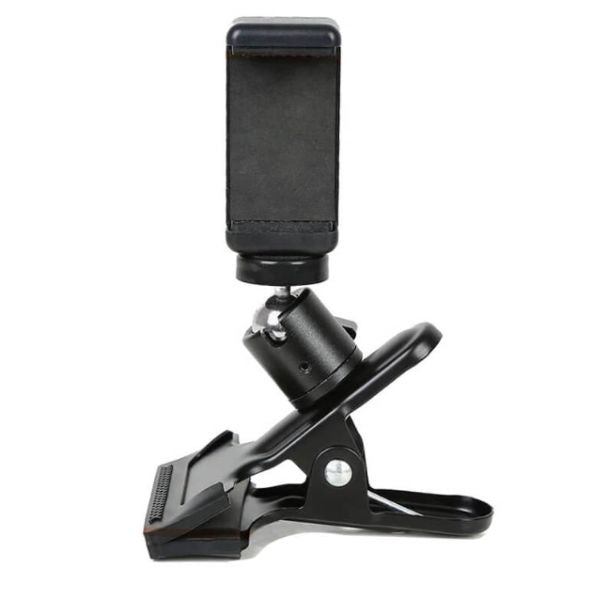
The ComfyGO Universal Phone Mount is sold for electric wheelchairs and scooters. Its rubber-lined alloy clamp supports an adjustable cradle that opens up to 4 inches. It is worth considering when the phone can sit close to a suitable mounting point. The seller does not list the clamp’s frame-size range, so confirm compatibility before buying. Think about whether you can operate the holder yourself or need help inserting and removing the phone.
ModularHose: a bendable arm for positioning — $

The ModularHose #110621 kit includes the phone holder, 14-inch flexible arm and spring clamp, assembled. The arm offers more positioning freedom when a nearby mounting point is not at the right viewing angle. Its clamp is intended for flat surfaces up to 2 inches thick, rather than assuming it fits round wheelchair tubing. Squeezing the clamp and bending the arm may require assistance. Shipping adds to the total; check the seller’s current charges.
RAM armrest mount: fixed-arm support with swivel — $
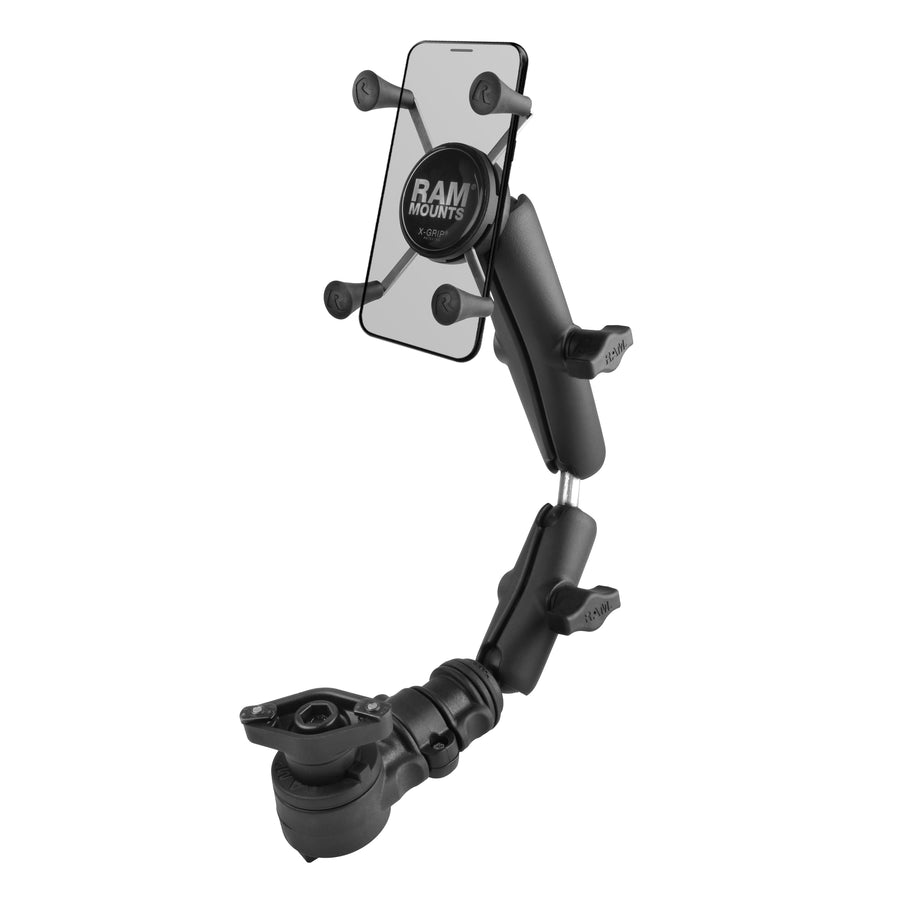
The RAM armrest mount with quick release and swivel uses rigid arms and adjustable ball-and-socket joints. Its base lets the mount swivel aside or disconnect without changing the joint settings. That may be useful when you want to return to a familiar viewing position. Confirm the armrest attachment fits your chair; operating the knobs, release and spring-loaded phone holder may require help.
RAM seat-track mount: fixed-arm reach from the chair base — $
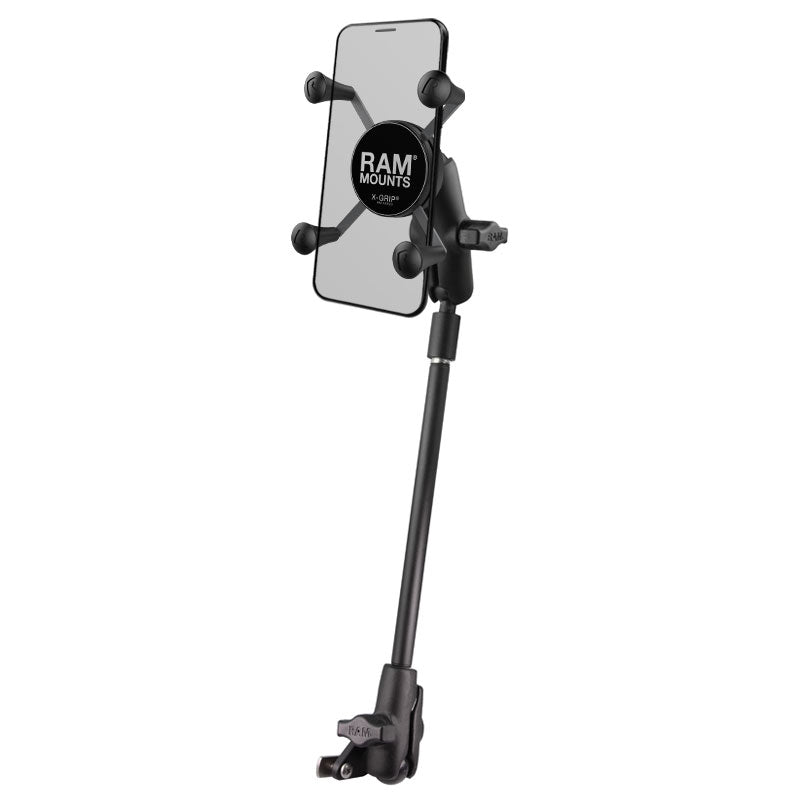
The RAM X-Grip wheelchair seat-track mount includes a track base, a rigid 9-inch pipe extension and socket arms for adjusting the phone’s position. It provides an alternative mounting point when the armrest is unsuitable. Check clearance for transfers and chair movement, and whether you can reach and operate the adjustment knobs.
Both listed RAM kits use an X-Grip holder specified for phones 1.875–3.25 inches wide and up to 0.875 inch deep. Measure with the case on. “Fixed-arm” here means rigid arm sections with adjustable joints; these mounts can still be repositioned.
Magnetic charging: one less tiny connector
Getting a charging cable into a small port can be its own dexterity exam. Magnetic wireless chargers may make positioning easier on compatible phones.
Apple MagSafe Charger: a charging puck that attaches magnetically to compatible iPhones.
Belkin Qi2 magnetic charging stand: an option to explore for compatible devices when an upright charging position is useful.
Check your exact phone, case, charger, and mount together. Android compatibility varies. A magnetic case does not, by itself, give a phone wireless charging.
Also consider removal: easy attachment does not necessarily mean you can pull the phone away comfortably. The charger still needs a power connection, and a magnetic holder does not necessarily charge.
Google glasses, Apple headsets, and projects worth watching
Google’s Android XR glasses page explains its work bringing Gemini into eyewear. You can also watch Google’s glasses demonstration. The appeal is clear: accessing assistance without repeatedly handling a phone. Actual usefulness depends on the device’s controls and the user’s access needs.
How much do Google glasses cost?
As of November 9, 2026, I could not find an announced retail price for Google’s upcoming Gemini-powered audio glasses from Warby Parker and Gentle Monster. Google’s Android XR page still lists those audio glasses as coming in fall 2026, while its display glasses are marked “stay tuned.” For now, the honest budget entry is price not yet announced.
Google’s announcement describes voice access to calls, texts, directions, photos and translations, with support for pairing to Android and iOS phones. Those features could reduce how often someone needs to handle a phone, but real accessibility will depend on the finished product and how its controls work for each person.
A separate product, XREAL AURA, uses Google’s Android XR platform and falls in the $$ premium cost tier, with shipments beginning in mid-November. These wired glasses connect to a portable computing puck and provide virtual screens for apps and entertainment. They are a different type of device from the upcoming everyday audio glasses.
Does Apple have wearable glasses?
Apple does not currently sell everyday smart glasses, and there is no officially announced Apple smart-glasses price or release date. Apple does sell Vision Pro, a headset secured with a headband in the $$ premium cost tier. Its larger design makes fit, comfort and putting it on or taking it off different considerations from ordinary eyewear. Check Apple’s store for current headset pricing and configurations.
For someone with limited hand movement, the practical question is whether a device lets you complete the task you need: read a message, answer a call, write, or navigate an app. Consider voice and alternative controls, comfort in your usual seated position, charging, and any help needed to put it on. A demonstration is more useful than assuming “hands-free” means every feature is independently accessible.
ALS-focused projects provide another supporting example. Google Research and Team Gleason’s SpeakFaster explores reducing the effort of composing messages through eye-gaze communication. EyeControl develops wearable eye-tracking communication technology. These projects address some overlapping access challenges, although they are different from Google’s consumer smart-glasses work.
Two years. One tool at a time.
I wish getting technology access back came with a clear instruction manual. In my experience, it has involved gradually finding the tools that let me participate again.
Being able to write, research, communicate, and make ordinary choices matters. So does being able to do those things privately, without asking someone to hold the phone or read every message.
Start with something you want back.
One message. One article. One idea you can finally get onto the page.
And eventually, perhaps, the freedom to send an unnecessary meme without convening a support team.


Leave a Reply